
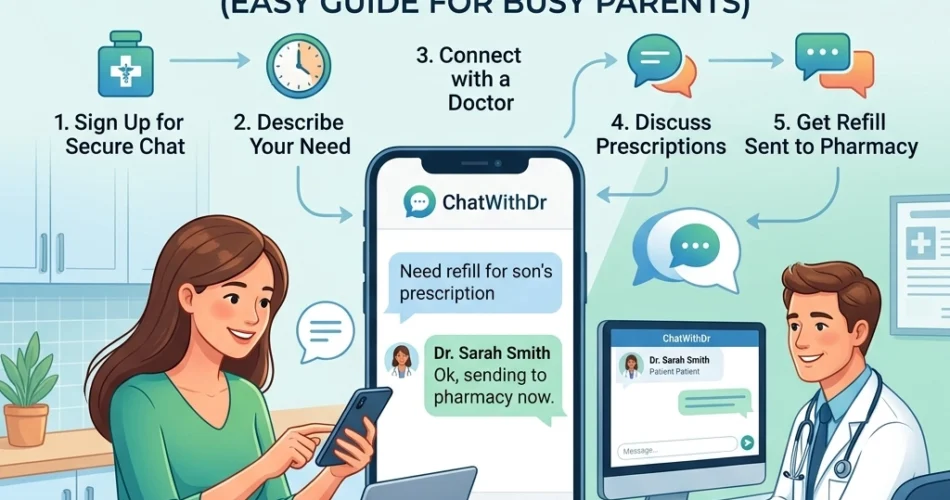
It is 4:00 PM on a Tuesday. You just realized your child’s prescription is empty, or perhaps your own maintenance medication has run out. In the world of parenting, these moments usually happen at the most inconvenient times: right before soccer practice, during the dinner rush, or after your primary care physician's office has already closed its phone lines for the day.
The traditional route involves calling the office, navigating an automated menu, waiting on hold, and hoping the nurse calls you back before the pharmacy closes. If that fails, your next option is often a stressful trip to a crowded urgent care center, where you’ll sit in a waiting room for hours just to get a simple refill.
Thankfully, healthcare technology has evolved. You can now chat with a doctor from your smartphone and secure a prescription refill without leaving your kitchen. This guide breaks down the five simple steps to getting your medication today using secure medical messaging.
Step 1: Verify Your Medication and Pharmacy Details
Before you start a consultation, preparation is key to ensuring a fast turnaround. When you use a service like ChatWithDr, the licensed US doctor will need specific information to process your request safely and accurately.
First, locate the original prescription bottle. You will need:
- The exact name of the medication.
- The dosage (e.g., 20mg, 500mg).
- The frequency (e.g., once daily, every 8 hours).
- Your preferred pharmacy’s name, address, and phone number.
Having these details ready prevents back-and-forth messaging and helps you stay within the within 30 minutes to 4 hours average response time. If you are looking for an online prescription for common conditions like a sore throat or strep throat, knowing when the symptoms started is also vital.
Step 2: Skip the Appointment and Registration
One of the biggest hurdles for busy parents is the administrative "red tape." Most telehealth platforms require you to create a lengthy profile, upload insurance cards, and schedule a specific time slot that you might not even be able to keep.
To get a refill today, choose a platform that values your time. At ChatWithDr, there is no registration or appointment required. You don't have to remember a password or fill out twenty pages of digital forms. You simply go to the website or app and start the process. This "on-demand" nature is designed specifically for parents who don't have the luxury of planning their medical emergencies three days in advance.

Step 3: Initiate a Secure Text Consultation
Many people assume telehealth requires a video call. However, for a busy parent, a video call can be intrusive. You might have a screaming toddler in the background, or you might be at your desk in the office.
Text-based telehealth services allow you to communicate with a licensed doctor through secure medical messaging. This means:
- You can chat while multitasking.
- You have a written record of the doctor’s advice.
- You can upload photos of your current medication bottle or a visible symptom (like a rash).
When you start the chat, you will pay a $39.99 flat-rate fee. There are no hidden costs, no surprise bills from insurance companies, and no subscription "traps." This transparency is essential for family budgeting.

Step 4: Describe Your History to the Licensed US Doctor
Once the chat begins, you will be connected with a licensed US doctor. It is important to be honest and thorough. Even if you are just looking for a refill, the doctor has a professional responsibility to ensure the medication is still appropriate for you or your child.
Explain why you need the refill today. For example:
- "I am traveling tomorrow and realized I’m out of my asthma inhaler."
- "My daughter finished her last dose of allergy meds, and her symptoms are returning."
- "I need an online UTI treatment refill because I can feel the symptoms starting again."
The doctor will review your history through the secure chat. Because this is a professional medical consultation, you are receiving the same quality of care as an in-person visit, but with the convenience of a 24/7 telehealth doctor.
Step 5: Send the Prescription to Your Local Pharmacy
After the doctor approves the refill, they will send the prescription electronically to the pharmacy you identified in Step 1. This is where the speed of ChatWithDr truly shines. With an average response time of 30 minutes to 4 hours, you can often start the chat during a lunch break and have the medication ready for pickup by the time you are heading home.
Once the doctor confirms the prescription has been sent, it is a good idea to give your pharmacy about 30 minutes to process it into their system before you show up at the drive-thru.

Why Busy Parents are Switching to Text-Based Care
The "waiting room culture" is fading. Parents are increasingly looking for online primary care options that fit into their lives rather than forcing their lives to fit around a clinic's schedule.
24/7 Availability
Fever and earaches don't follow a 9-to-5 schedule. Having access to a 24/7 online doctor means you can get answers at 2:00 AM without having to load the kids into the car for an ER visit.
Cost-Effectiveness
At a $39.99 flat rate, chatting with a doctor is often cheaper than the co-pay for an urgent care visit, and certainly cheaper than an out-of-pocket emergency room bill. For families without insurance or those with high-deductible plans, this is a game-changer.
Privacy and Comfort
Discussing medical issues can be sensitive. Whether you are seeking online ED treatment, online birth control, or help with online weight loss medication, the ability to text quietly from your phone provides a level of privacy that a physical office cannot match.
Common Conditions for Quick Refills and Consultations
While some medications (like controlled substances) cannot be prescribed via telehealth, many common family needs are handled daily through the ChatWithDr platform:
- Respiratory Issues: Cold, flu, and COVID symptoms or routine asthma refills.
- Skin Conditions: Accessing an online dermatologist for rashes, eczema, or acne flare-ups.
- Infections: Online urgent care for UTIs, sinus infections, or online STD testing requests.
Maximizing Your Time-to-Treatment
To ensure you get your refill as quickly as possible, follow these "Pro Parent" tips:
- Use the App: While the website is great, having the app on your phone allows for push notifications so you know exactly when the doctor has replied.
- Be Detailed: The more info you provide in your initial message, the faster the doctor can work. Mention any drug allergies or other medications you are currently taking.
- Check Pharmacy Hours: Before requesting a refill at 8:00 PM, make sure your local pharmacy isn't already closed, or choose a 24-hour location.

Final Thoughts for the On-the-Go Family
The goal of modern telehealth is to remove the friction between a patient and the care they need. For a parent, "friction" is anything that takes you away from your children or your work for longer than necessary. By following these five steps, you can navigate a medical hurdle with minimal stress.
Whether it is a routine refill or an urgent need for online urgent care, the doctor is just a text away. You don't need an appointment, you don't need a high budget, and you certainly don't need to wait in a plastic chair in a lobby full of germs.
Ready to get started? You can chat with a doctor now or learn more about how it works.
Download the ChatWithDr App:
- iOS: https://apps.apple.com/us/app/chatwithdr-online-doctor-24-7/id6758861710
- Android: https://play.google.com/store/apps/details?id=com.chatwithdr.app
Disclaimer: This information is not a substitute for professional medical advice, diagnosis, or treatment. Always seek the advice of your physician or qualified health provider with questions regarding medical conditions or treatments.
Related posts:
 Medication Refill Online Doctor: medication refill online doctor for fast access
  Your Guide to a Cheap Online Prescription Refill
  A Complete Guide to Online Doctor Prescription Refills
  Need a Prescription Refill Fast? How to Get One Online in Under 2 Hours
  How to Use an Online Doctor for Refills The Simple Way